In the last few weeks we a started a blog together with team of filmmakers in South Africa. This new blog (located here indiefilmlive.blogspot.com is allowing others to see and learn from a new independent filmmaker workflow. This is an effects heavy independent project that is really pushing the envelope; shooting multicam HD100s with 35mm lenses to Wafian disk recorders. CineForm and Wafian are optimized our tools to meet the needs of this project and the production team at Atomic VFX. This is all real, not a marketing exercise, if the filmmakers find bugs they will report them there.
In a recent thread on indiefilmlive.blogspot.com, there was some discussion of understanding the differences between 8 and 10-bit workflows. The Atomic VFX team was attempting to create a difference matte between 8 and 10-bit files, yet is turns out the compositing tools have some difficulty doing this. Read all the details at indiefilmlive.
Sunday, November 20, 2005
10-bit workflow testing

Sunday, November 13, 2005
Meet the Filmmakers
A couple of days ago I was honored to attend an event thrown by AMD, Microsoft and the Austin Film Society. This was my first trip to Austin (unfortunately only for a 20 hour visit) but I will definitely return. The event was very well attended by Austin area filmmakers for primarily a social gathering with some short presentations from some celebrity filmmakers : Mike McCoy (producer and star of Dust to Glory) and Robert Rodriguez of Troublemaker Studios (writer, director Sin City, Spy Kids 1,2 & 3, ...) I was attending as the sole demo artist, showcasing what CineForm products can do for the indie filmmaker. Now this was not a tradeshow, this is a party with an open bar in a 6th St. night club, hardly the venue to demo software technology. Yet many brave filmmakers did choose to approach the long haired geek (myself) amongst the glowing computer gear.
This was a great learning experience for me, as this was a far better cross-section of indie filmmakers, than those that go to NAB or SIGGRAPH. So even at an event thrown by AMD and Microsoft, there were a lot of Final Cut Pro users, but more amusingly many assumed I was demonstrating FCP (I repeat, at an AMD/Microsoft event.) It is true that Adobe Premiere Pro does look much like FCP, and for good reason, it is aiming to be the FCP of the PC (and has pretty much succeeded technically in most areas.) There is now no longer that great divide between the feature sets of the competing low cost (pro) NLEs on either platform. The market potential that created the FCP phenomena doesn't exist today, yet the illusion still exists. I think many viewers of my demo assumed I was using FCP; after all, they have seen FCP do cool stuff (and no one can market better than Apple.) When I explained that, no, this was Premiere Pro running CineForm's Prospect HD/2K, the follow up question was often, "Can I do that?" on FCP, and the answer, again, was no.
It's not what I was showing couldn't be done under FCP in the future, but some of the same forces that have PC dominating the desktop are again at work against Apple. Compared to Premiere Pro, Final Cut Pro is a closed architecture, all major new features must come for Apple alone, third party vendors can only really enhance existing features within the product. Premiere Pro, on the other hand, is open, with a hardware abstraction layer (HAL) that allows thirds to add and extend beyond the core feature set. For example, integrated HDV editing within FCP could only come from Apple, whereas the intial Premiere HDV editing -- way ahead of Apple -- came from small third parties like Main Concept and CineForm. Apple's FCP certainly has lost some gloss over the HDV introduction, and even today users have no support for 24p HDV (unlike various PC solutions, including CineForm.) Not that Adobe alone has great HDV either, yet it is greatly supplemented by third party integration. Apple has plenty of compelling reasons to create a good HDV implementation, as this prosumer format is heading to become the new DV, which equates to lots of platform and software sales. However, the many smaller niche markets can't be served by Apple engineering, creating opportunity for companies like CineForm (but unfortunately for Apple this is easier to do on another platform.)
The niche market that has opened up though FCP's closed archecture are tools and workflows for independent filmmakers, the market that used to be FCP's turf excusively. The independent filmmaker is looking for the most cost effective solution to post his or her project, without compromising the final product. A simple enough desire, yet the allure of HD has complicated matters greatly for these filmmakers. It is very expensive to post and online HD production, forcing most into an offline workflow (an alien experience for DV shooters.) Even offline has additional expense such as the conversion cost from creating offline ready DV dubs from a HDCAM shoot (approx. $80 per 40 min HDCAM tape equals thousands for an average feature) -- then the online costs are still in the production's future. The offline then online approach is the typical FCP workflow, as it is for Avid, really it is the traditional workflow. Yet the indie filmmaker is not concerned with tradition -- neither Mike McCoy nor Robert Rodriguez were speaking at this event because they followed tradition.
So what did I demo at this event and how does it differ from the traditional workflow? I was showing the first 10 minutes of a feature shot on super-16 scanned at 2048x1276 10-bit log (26% more data than 1920x1080 HD) yet this 2K project fit in 10GBytes (which I had backed up on my iPod.) This project was playing on a dual opteron workstation, with the 2K media running from two drives in a simple striped RAID 0 configuration (inexpensive and standard.) On this system I showed that I could playback and mix three of these 2K sequences all in real-time. Three streams of 2K is simply not possible in any other practical workflow. What this all means is the tranditional off-line workflow can be entirely skipped. Now the workflow is free the the rigid ordering of : offline editing -> lock down -> conform to uncompressed -> complete FX work -> flatten the timeline (render, otherwise it won't even preview) -> color corrector (render) -> master out. With a compressed online workflow, steps can be performed in any order, and as you have the resolution image available at all times, HD dubs are ready available for marketing your project, all on much lower hardware costs. Under FCP for a 2K (film) or HDCAM projects, all you get is either a single stream compressed or single stream uncompressed -- no real-time, no workflow enhancement. For Apple to compete they need to open up FCP's achitecture to allow third parties to keep their product moving forward.
In the end, the idea of a compressed digital intermediate is not new; it has been around for may years as real-time DV editing. All CineForm has done is removed the bit-rate and resolution limitations of these camera formats DV, HDV, and DVCPRO-HD, and made film and HD resolutions edit as easy as a DV project without the quality compromise of all the camera based compression. An old workflow re-invented for a new filmmaker.
Sunday, October 30, 2005
JVC HD100U frame rates
Last weekend I went up to Hollywood Studio Rentals to demonstrate the CineForm products as part of the DV Camps training seminar (www.dvcamps.com.) I've done this show before when the JY-HD10 was first launched two years ago. This time around the gear was for more suitable for the filmmakers that were in attendance. The Prospect HD work-flow combined with the new Wafian on-set recorder was demonstrated operating with the new JVC GY-HD100U. For this demo we captured the JVC's 60p analog feed (through an AJA HD10A digitizer to output HD-SDI) into the Wafian disk recorder; then, just a moment later we sent the captures data via GigE to the Prospect HD editing system for playback and editing as either a 60p clip or a prefect 2.5X slow-motion at 24p. This seemed a crowd pleaser.
Although CineForm products fully support all the JVC's modes over FireWire, capturing directly from the analog feed has several quality benefits. Bypassing the MPEG compression of HDV is significant one, yet there is also the increased chroma resolution of 4:2:2 vs HDV 4:2:0. Even for users of the HVX200 will get both resolution and chroma image enhancements by bypassing that camera's DVCPRO-HD 720p compression which has a normalized (to 1280x720) sampling resolution of 3:1½:1½. There are also frame rate advantages, particularly for HD100 users. When the JVC camera is in 30p mode the analog output is at 60p, similarly for the 25p mode the analog feed is 50p; so what happens at 24p? I expected a 3:2 pulldown of the 24p into 60p (somewhat like the 24p mode does on tape), however the camera actually puts out a true 48p with a 1:1:1:2 pulldown into 60p. This means for standard shooting/slow-motion rates, that options are 24, 25, 30, 48, 50 and 60 frames per second. With additional selective frame recording, correctly cadenced frame rates of 1, 2, 3, 4, 5, 6, 8, 10, 12, 15, 16 and 20 fps are also available. How cool is that? Really, I want feedback on this so we can determine what sort of capture frame rate controls are implemented within Prospect HD and similarly within the Wafian recorder. The JVC HD100 is shaping up to be an excellent indie filmmaker camera.
Wednesday, October 12, 2005
Canon XL-H1 early results.
While one of our engineers is having fun learning about our newly-arrived JVC HD100U, that has left me some time to spend with the new Canon XL-H1, with a particular focus on its HD-SDI abilities. The HD-SDI feed is great for on-set monitoring and direct acquisition that bypasses the MPEG compression. Note: If you are using direct HD-SDI capture, you can't use the magnify feature for focus assist because the magnified image is sent over HDSDI. Anyway, you don't needed the magnify feature anyway because the peaking focus assist works very well.
I used a Prospect HD system to capture HD-SDI directly from the camera and compress on the fly into CineForm Intermediate. The results are nice. The 24F stream doesn't use HD-SDI's 24PsF mode (segmented frame), rather it delivers a 60i stream with standard 3:2 pulldown applied (although the data is presented with the proper 24p cadence.) We will be quickly adding real-time pulldown extraction to Prospect HD for direct support for the 24F mode, so 24P editing will be straight forward.
The image quality is excellent, really! The 24F image doesn't quite resolve the same image resolution as the 60i, but it seems higher than one interpolated field; we still have more to learn about 24F. I expect this will be a very popular shooting mode. The HD-SDI feed is 8-bit not 10-bit unfortunately, although someone at Canon had already stated that -- I really hoped to find that information incorrect. Please Canon, 10-bit support in a future update! That said, its clean uncompressed 1920x1080 8bit feed is still very nice. That is what I have learned to date.
Monday, October 10, 2005
New gear at CineForm
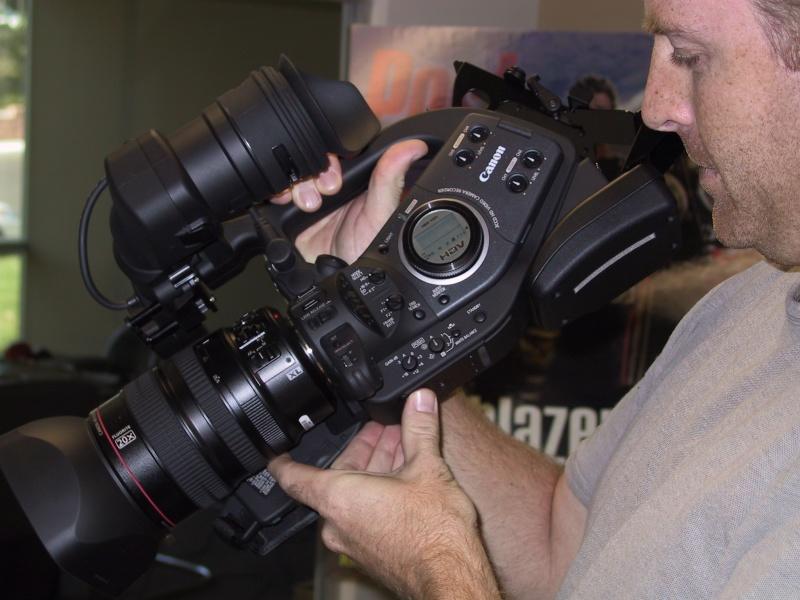 Thank you Canon! Having the new Canon camera before it hits the market will greatly help CineForm be the first to support ALL its features. We intend to directly support the Canon 24F/30F modes within Aspect HD and Connect HD, and Prospect HD will additionally add support for this camera over HDSDI.
Jeff (CineForm engineer) is pictured modeling the camera soon after its arrrival.
A second thanks also goes to JVC for getting us their deck way ahead of the HD100U shipment, enabling Aspect HD to be the first to support the ingest 24p from Pro HD source (are we still the only commercial NLE solution to support that mode?) Now that JVC has also shipped us a production sample of the camera, we will have some exciting new features/products for the now wide range of of inexpensive HD cameras.
Sunday, September 18, 2005
Learning about the Canon XL-H1
This camera caught me by surprise as many of the camera vendors now contact CineForm before they announce their HDV camera (even many non-HDV vendors discussion CineForm implementations.) However this is a very nice surprise, and we all expect Canon to have a high quality solution. As the XL-H1 is a 1080i HDV camera it will be closely compared with the Sony HVR-Z1; neither camera offers a progressive imaging sensor, yet both have a pseudo 24 frames implementation -- speculation on this is great as the Sony method under-whelmed the market, Canon may/should take a different approach (see my speculation below). The good news is this new camera should operate flawlessly with all CineForm products as it complies with existing HDV and HDSDI (bonus) standards.
The clear difference between this unit and other HDV cameras is the addition of HDSDI. We already have several customers using live HDSDI feeds into Prospect HD workstations for onset capture, bypassing the camera compression of HDCAM/DVCPRO-HD etc, so the same work-flow will apply for the Canon XL-H1. So just like the high end HD solutions, the HDSDI feed is pre-compression, the raw data from this HDV camera is the highest quality feed, perfect for Prospect HD's 10-bit CineForm Intermediate compression (the HDV tape acts as a backup only.) There has been speculation whether the HDSDI feed is 8-bit or 10-bit YUV 4:2:2. I believe it is more likely to be 10-bit, counter to a few opinions, as there is no technical reason not to output 10-bit. The RGB CCDs capture light in a linear manner with 12 to 14 bits of precision (depending on the sensor), after in camera processing the resulting RGB linear data is converted to YUV 4:2:2 in a 709 colorspace. The RGB precision is plenty to support a 10bit YUV gamma corrected output. The top 8-bits would then be sent on to the MPEG compressor (where it is further down sampled to 4:2:0.) If the processed linear RGB data is converted directly to 8-bit YUV, that would have been an error on the part of Canon engineering (so I don't think they would have done this), particular as HDSDI is inherently 10-bit (8-bit data is sent as 10bit with the two least significant pixels set to zero.) So as soon as cameras are available it is straight forward to determine the bit-depth of the HDSDI feed.
As we will get an uncompressed 1920x1080 out from HDSDI (higher than HDV's 1440x1080) the sensor resolution is significant. Canon has increased the resolution over the Sony Z1's three CCDs of 960x1080 (which use a horizontal pixel shift of the green sensor to increase the effective resolution to approach that of 1440.) Instead the XL H1 has gone with 3 16x9 CCDs of 1.67M pixels each, suggesting a sensor resolution of around 1720x970 (assuming square pixels.) I just read that the effective sensor area for HD is 15.6M pixels, which would indicate of non-square pixel sensor of 1440x1080 (which makes better sense.) If the lens allows, this should resolve a sharper (or detailed) image. The down size of so many picture elements on a 1/3" CCD, is a reduced light sensitivity. Sony the 960x1080 CCD, with their extra elongated pixels, have a larger area to collect light, and therefore potentially slightly more sensitive.
The most anticipated element of the XL H1 will be how it achieves 24 frame acquisition using a interlaced sensor. Canon has been up front with the 24 mode not being acquired in a true progressive sense, but in one statement it seems it will not have the motion jutter of Sony's CineFrame 24, which suggests the sensor may be run at 48Hz rather then 60Hz for the 24F mode. This will be an excellent first step. However if all data is interpolated from a top or bottom field, the vertical resolution can't exceed 540. I don't give much weight to an intelligent de-interlacing process, as that will potentially introduce motion artifacts as the good algorithms would take too long for the camera to compute. Canon could generate a good resolution pseudo progressive image if they ran the green CCD with reversed field dominance (output a bottom field when red and blue CCD output a top field) this way the same pixel shifting technology that makes Sony's 960 res CCD output near 1440, could help the three 540 fields (red-blue and pixel shifted green) could achieve a progressive vertical resolution approaching 810 (which is about the maximum a normal interlace picture can achieve any way.)
One last note on the 24F mode. The "Advance" 2:3:3:2 pull-down of 24p DV is unnecessary in HDV as there in no frame compression used in the 1440x1080 mode (spec HD2.) As only field compression is used, the standard 2:3:2:3 pull-down will work perfectly well. A true progressive frame signal can be exacted with ease.
P.S. 10/12/05 -- Now that we have a camera I have posted some real world data.
Saturday, September 17, 2005
So many new HD cameras to choose from, so much misinformation.
There is much heated discussion on the various HD and HDV forums regarding sensor resolution, compressed types and bit-rates of the new crop of prosumer HD cameras. So much is focused on these elements, yet the numeric data is often less significant than the quality of the lens and the physical size (not resolution) of the CCD/CMOS. This is encouraged as so much of the marketing of these cameras is rooted in the numbers -- three CCDs is assumed to better than one, chroma sampling 4:2:2 better then 4:2:0, and 100Mb/s is better than 25Mb/s, all seems so true, yet in most cases the impact of image quality is far more complex than that, with the numbers often hiding more significant characteristics.
What is the true resolution of a camera? Put a resolution chart in front of its lens and you have better information than any of the marketing data. However the ability to resolve detail will be impacted by the sensor resolution, physical pixel size, compression resolution and chroma sampling. I in the next few post I intended to go into interesting technical details on a range of these new cameras, pointing out where I think the marketing information based on the numbers are either misleading or significant to the final out image quality.
Here are the range of the sub-$20k HD cameras that are annouced or currently available.
Canon XL-H1
Grass Valley Infinity
JVC GY-HD100U
Panasonic HVX-200
Sony HVR-A1
Sony HVR-Z1
Sony XDCAM-HD
I intend to discuss a little on each. Please point out if I have missed any interesting new cameras.